
Use data analysis design database task
CSG1207D Systems and Database Design
Assignment Task 2 – (Implementation and Testing) Trimester 1Task 2 – Implementation & Testing
Once your database has been designed, it is time to implement it in a DBMS, populate the database, and then manipulate the data via queries. You should incorporate any feedback on Task 1 you were given by your lecturer by modifying your design documents i.e. your ERD and your TICs. If the database you implement includes anything you had not included in your database design (Task 1), include an updated database design document, which notes the changes/additions to the design you submitted for Task 1. This will include your physical ERD and TICs.The deliverables of this task are three files containing SQL statements. We will be using Microsoft SQL Server 2014 or above – your SQL scripts must run in the same environment used in the unit/labs.

Make sure this script can be run multiple times without resulting in any errors. Examine the creation script of the Company database available on Moodle for an example of how to do this.
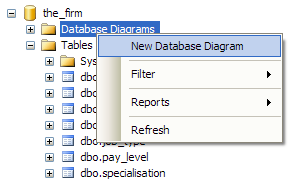
Once you have created your database, you should use SSMS to create an ER diagram and use this to verify that your implementation matches your design. This can be done by right clicking on the “Database Diagrams” folder of the database in the Object Explorer in SSMS.
 |
|---|
To assist with this, I have included data for a number of tables in the create_TEMPLATE.sql file
Page 2 of 7
• The full name of the pilot, co-pilot and flight service manager.
▪ Concatenate the first name and last name into one column, e.g. “Joe Bloggs”.
(example partial output of the Flight Instance View – your data may vary, example illustrates structure only)
Departing Flight Information View
Write a view that selects the flight number, arrival airport code,
departure time minus one hour and model number of all upcoming flights
(departure time in the future). Give the columns aliases of “Flight
Number”, “Destination”, “Boarding Time” and “Plane”. Order the results
by departure time. Using the Flight Instance View in this query is
recommended.
 |
|---|
Page 3 of 7

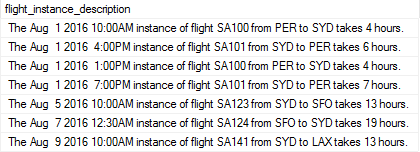
“The [departure time] instance of flight [flight number] from [departure airport code] to [arrival airport code] takes [travel time in hours] hours.”
The travel time can be calculated with the DATEDIFF function using
the departure time and arrival time columns. You will need to
CAST/CONVERT the data type of some columns.
Using the Flight Instance View in this query is recommended.
 |
|---|
Page 4 of 7

 |
|---|

Presentation, Notation, Formatting and Submission IMPORTANT!! Read and comply with the following
Demonstration
You may be required to give an in-person demonstration of your database.
This will consist of running a few scripts and answering questions as
requested by your lecturer. Please note that if you are
not present for the demonstration you will not be awarded marks
for the assignment. If, during the demonstration, you are
unable to demonstrate sufficient understanding of your work, you will
not be awarded marks for this assignment.
Deductions
Page 6 of 7

| Total: | 40 (20% of unit) |
|---|
Page 7 of 7





