
Has the same power and flexibility the jmx console
40 CHAPTER 2 Managing the JBoss Application Server
The URLList attribute block B points to properties files that contain system proper-ties. You can provide a URL or a directory relative to the root of the server configura-tion. If you provide multiple entries, separate them with commas.
Another alternative, which we don’t cover in this book, is the JBoss Operations Net-work (JBoss ON), which is a web-based tool that provides a single point of administra-tion for an enterprise that has deployed JBoss AS. You can use JBoss ON to monitor things such as multiple application servers, multiple Tomcat servers, and even the sys-tems on which the servers are running. JBoss ON is available only with a paid JBoss AS support subscription.
JBoss AS 5.0 has a new administration console which is a subset of the administra-tion functionality found in JBoss ON. You can use this administration console to con-figure data sources and message destinations. We don’t cover the administration console in this book because, as of this writing (JBoss AS5.0.0.CR2 is the current ver-sion), the administration console still isn’t available. The administration console will either come with JBoss AS5.0.0.GA or will be available as a separate download.
Each MBean is listed as a link which, when clicked, displays details about that MBean. For example, figure 2.6 shows the data displayed for the connection pool for the DefaultDS data source.
The top half of the MBean details page displays a table listing the property values for the MBean. If a property is writeable, the value is presented in a form field. You can change the value and click the Apply Changes button at the bottom of the table to change the value of the property.
|
|
|---|
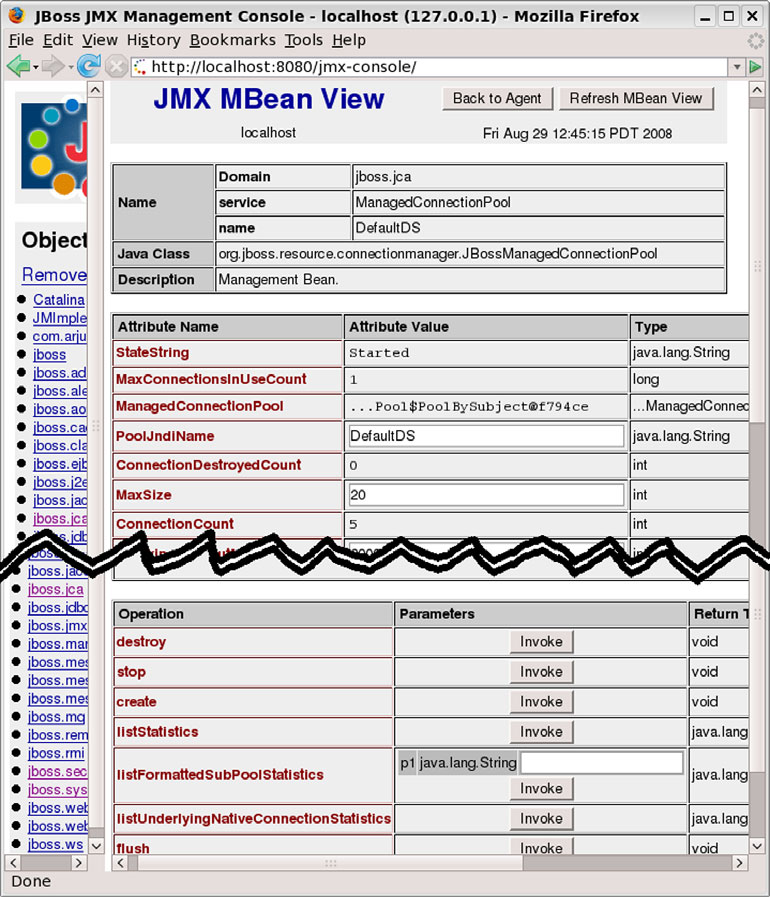
Figure 2.6 A JMX Console MBean detail page, showing information about the DefaultDS data source
Examining interesting MBeans 43
server documentation; there are even examples of common twiddle usage, so we’ll not repeat them here and, instead, urge you to read the documentation.
Now that you know how to access MBeans using both the JMX Console and twiddle, let’s look at some MBeans that contain information that you might be interested in.
2.4 Examining interesting MBeans
■ jboss.system:service=ThreadPool—Enables you to change the thread pool size
■ jboss.system:type=Server, jboss.system:type=ServerConfig, and jboss. system:type=ServerInfo—Provide a wealth of information about the server
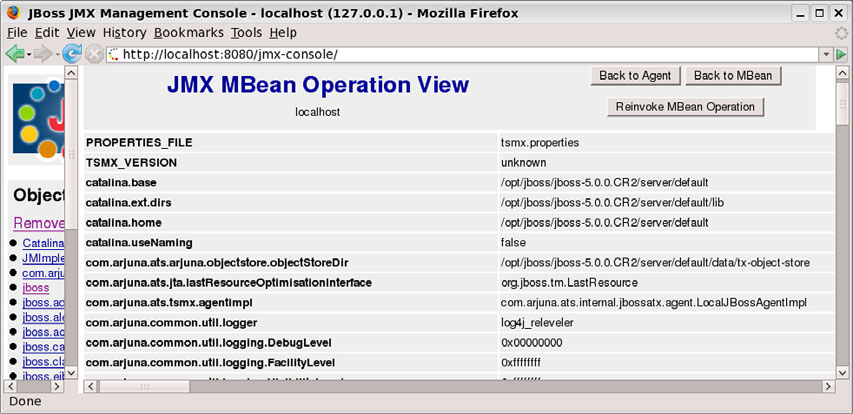
The jboss:type=Service,name=SystemProperties enables you to examine the sys-tem properties. The showAll method returns a collection of system properties. The output from the showAll method as seen in the JMX Console is shown in figure 2.7. The list of properties is in alphabetical order. Well, actually, it’s ASCII order.
Sooner or later, when looking up an object in JNDI, you’ll get a class cast exception or, perhaps, a name not bound exception. When that happens, you now know where to look to view the names and namespaces.





