
Configure asa basic management and firewall settingsnote default


Practice assessment


Practice assessment
Required Resources
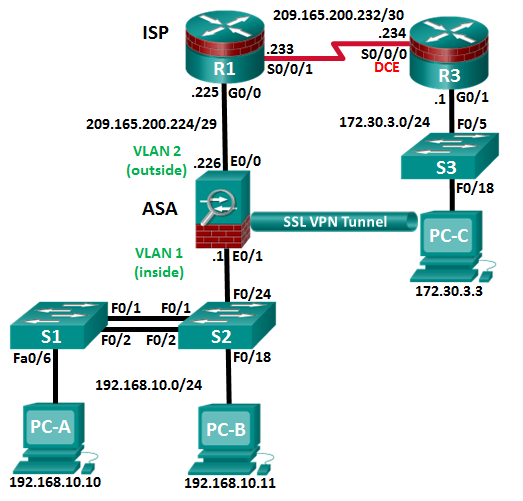
• 3 Routers (Cisco 1941 with Cisco IOS Release 15.2(4)M3 universal image or comparable)
• Ethernet and Serial cables as shown in the topology
Verify Network Connectivity
| Configuration Task | Specification | Points |
|---|---|---|
|
1/2 | |
|
1/2 |
following:
| Configuration Item or Task | Specification | Points |
|---|---|---|
|
1 | |
| 1 | ||
|
1 | |
|
1/2 | |
| 1/2 | ||
| 4 | ||
| Configure VTY lines to allow SSH access. |
|
1 |
|
2 |
| Configuration Item or Task | Specification | Points |
|---|---|---|
| 2 | ||
|
3 | |
|
3 | |
| 2 | ||
|
2 | |
|
2 |
Page 3 of 9


Page 4 of 9


| 2 | ||
|---|---|---|
|
2 | |
|
3 |
Note: Not all security features in this part of the exam will be configured on all switches. However, in a production network, all security features will be configured on all switches. In the interest of time, the security features are configured on only S2, except where noted.
In Part 5, you will configure security settings on S2 using the CLI. Configuration tasks include the following:
Practice assessment
|
1/2 | |
|---|---|---|
| 2 | ||
|
2 | |
|
2 | |
| 3 | ||
|
1 | |
|
1 | |
| 3 |
Troubleshoot as necessary to correct any issues.
Configure ASA Basic Management and Firewall Settings
Page 6 of 9
| 3 | ||
|---|---|---|
|
1 | |
|
1 | |
| 1 | ||
|
2 | |
|
1 | |
| 2 | ||
|
|
2 |
| 1 |
In Part 7, you will configure an AnyConnect SSL remote access VPN on the ASA using ASDM. You will then use a browser on PC-C to connect and download the Cisco AnyConnect Secure Mobility Client software located on the ASA. After the software has downloaded, you will manually install the AnyConnect software to PC-C and use it to establish a remote SSL VPN connection to the ASA.
Step 1: Configure SSL VPN settings on the ASA using the ASDM from PC-B.


Practice assessment
| 7 |
|---|
To establish an SSL VPN connection to the ASA, you will need to use a browser on PC-C to download the Cisco AnyConnect Secure Mobility Client software from the ASA. After the software is downloaded, you will install the AnyConnect software to PC-C and then establish an SSL VPN connection to the ASA.
The steps required are as follows:
| Router Interface Summary | ||||
|---|---|---|---|---|
| Router Model | Ethernet Interface #1 | Ethernet Interface #2 | Serial Interface #1 | Serial Interface #2 |
|
|
Serial 0/0/0 (S0/0/0) | ||
|
Serial 0/0/0 (S0/0/0) |
|
||
| Serial 0/1/0 (S0/1/0) | ||||
Page 8 of 9


|
Serial 0/0/0 (S0/0/0) | |||
|---|---|---|---|---|
|
|
Serial 0/0/0 (S0/0/0) | ||





