
Click the add windows components button

Protecting Your Perimeter • Chapter 2 103
4. Highlight Terminal Services and click Details.
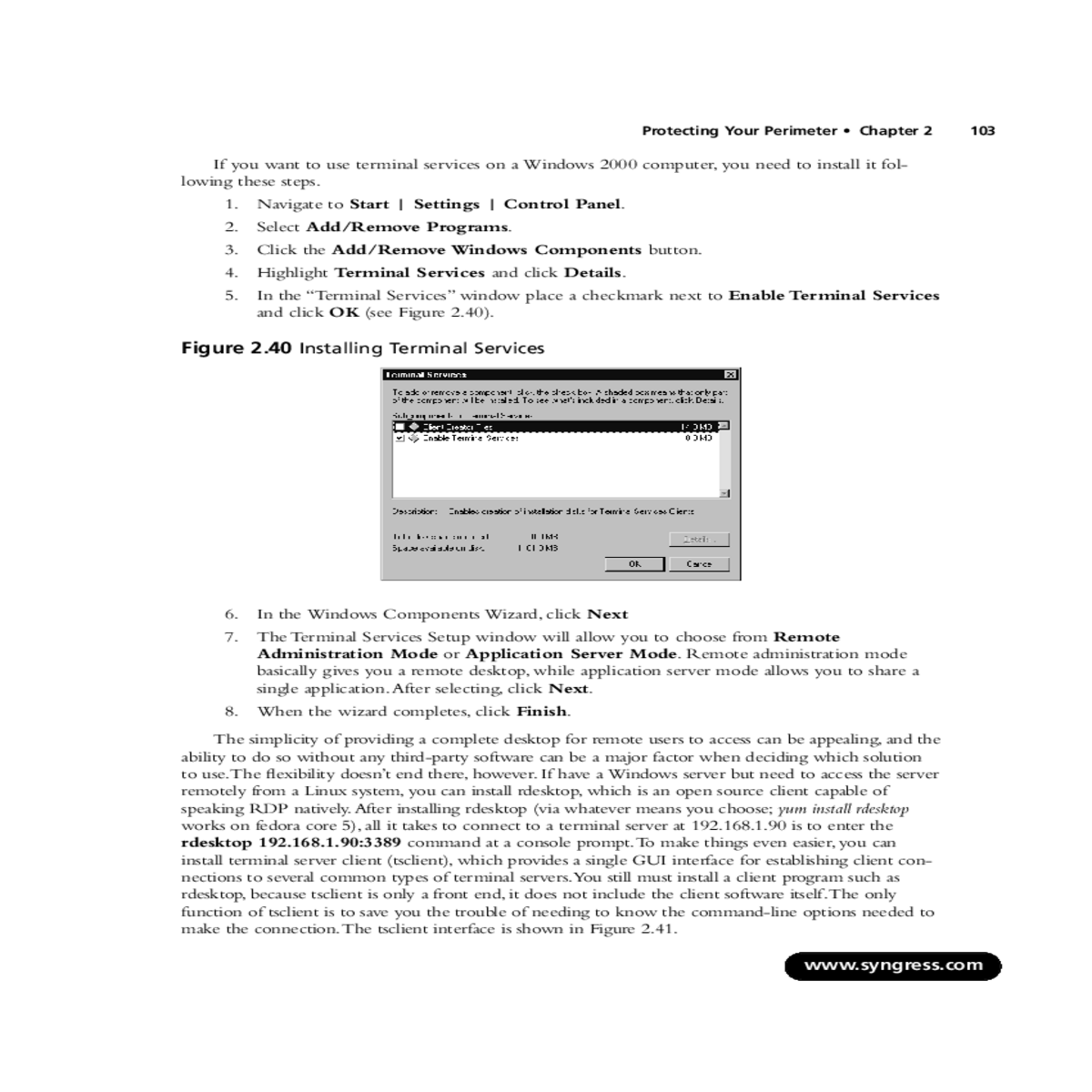
5. In the “Terminal Services” window place a checkmark next to Enable Terminal Services and click OK (see Figure 2.40).
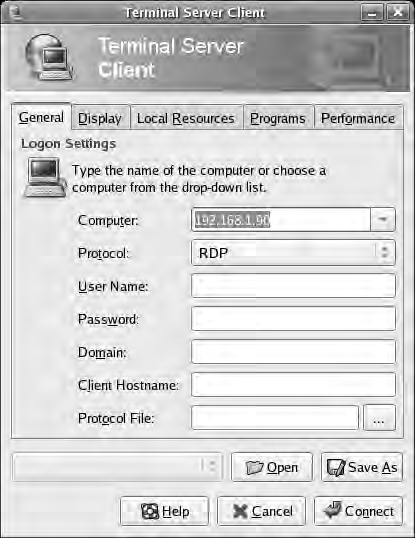
The simplicity of providing a complete desktop for remote users to access can be appealing, and the ability to do so without any third-party software can be a major factor when deciding which solution to use.The flexibility doesn’t end there, however. If have a Windows server but need to access the server remotely from a Linux system, you can install rdesktop, which is an open source client capable of speaking RDP natively.After installing rdesktop (via whatever means you choose; yum install rdesktop works on fedora core 5), all it takes to connect to a terminal server at 192.168.1.90 is to enter the rdesktop 192.168.1.90:3389 command at a console prompt.To make things even easier, you can install terminal server client (tsclient), which provides a single GUI interface for establishing client con-nections to several common types of terminal servers.You still must install a client program such as rdesktop, because tsclient is only a front end, it does not include the client software itself.The only function of tsclient is to save you the trouble of needing to know the command-line options needed to make the connection.The tsclient interface is shown in Figure 2.41.
| www.syngress.com |
|---|
VNC computing and has been around for a long time. It has gone through a lot of changes and is now available under many names, each with their own focus.This resembles the situation with Linux distributions in that the number of options can sometimes make it difficult to know which one is the best choice. Some of the more prominent are RealVNC,TightVNC, UltraVNC, and more. TightVNC (www.tightvnc.com/) encrypts the password exchange when you initially logon, but the rest of the session is unencrypted. While you could use an encrypted tunnel to encapsulate the VNC session, the other alternatives include native encryption support. RealVPC Personal Edition
(www.realvnc.com/) includes support for AES128 encryption, but is only available for Windows plat-forms.This leaves my current top choice as UltraVPN from http://ultravnc.sourceforge.net/. In addi-tion to providing encryption plug-ins, the UltraVNC server will run on any Windows system (Windows 95 thru 2003) and allows you to connect to it from any system with a compatible browser.To install UltraVNC follow these steps.1. Download the UltraVNC setup file.The setup program includes both the client (the viewer) and the server component.
| www.syngress.com |
|---|
| 2. | Protecting Your Perimeter • Chapter 2 | 105 |
|---|---|---|
| 3. | ||
| 4. | ||
| 5. |
|
|
| 6. |
|
|
| 7. | ||
| 8. |
10. Next is the “Additional Tasks” screen, which has some additional options.The more note- worthy are outlined in this section.
■ Register UltraVNC Serer as System Service This will cause the server compo- nent to be installed as a service. If you install this, the server will be started automati- cally. If you choose not to install the server as a service, the server will need to be started manually in order for someone to connect to the server. Requiring a manual start is more secure, but installing the server as a service might be a legitimate need in your environment.
11. After making your selections, click Next.
12. Accept the defaults for any needed configuration files in the next couple of screens (such as the MS-Logon ACL file, if those options were checked) and then click Install.
106 Chapter 2 • Protecting Your Perimeter
Figure 2.42 UltraVNC Server
1. Place a checkmark next to Use: and select the appropriate plug-in from the drop-down box. More plug-ins are available from http://msrc4plugin.home.comcast.netndex.html.
There are currently three different encryption plug-ins available:
| www.syngress.com |
|---|
■ ARC4Plugin This plug-in provides RC4 128-bit encryption and handles the pass- word slightly differently than the preceding one.
■ AESV2Plugin This plug-in provides AES 128-bit encryption.
| 2. 3. |
|
|---|
configuration window.
| www.syngress.com |
|---|





